
Avodek
Private Browser + AI
Avodek is a privacy-first browser for iPhone and iPad that blocks trackers, detects phishing threats, and gives you powerful tools to extract what matters from the web.


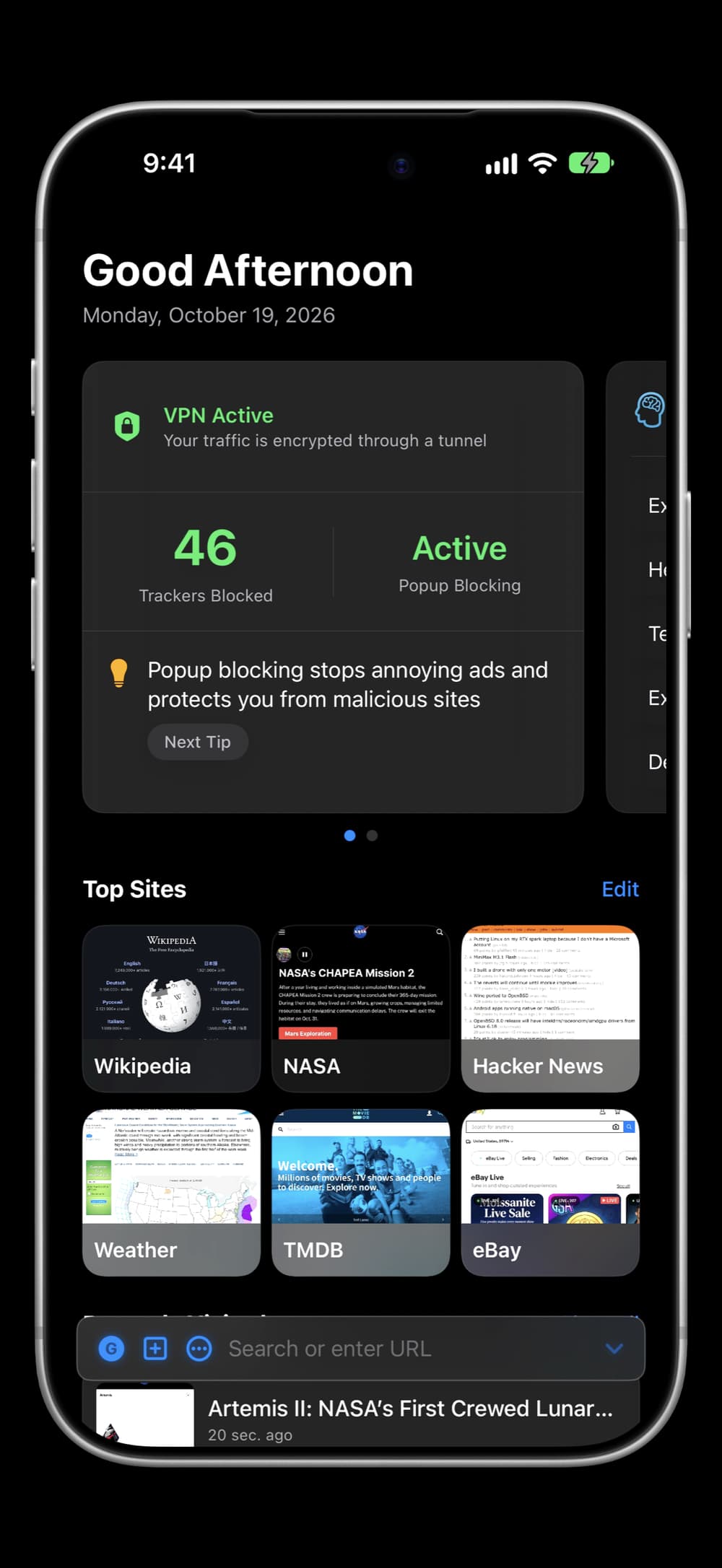
Built-in AI chat and page summaries, image and contact extraction with international address support, a clean reader mode that remembers your text size and theme, and a download manager with safety warnings.
All while keeping your data on your device. Free to download, no account required.
Screenshots
Features
Privacy & protection
Tracker and ad blocking
Cryptominers too, with a live blocked count
Phishing warnings
Lookalike sites and invalid certificates too
Global Privacy Control
Asks sites not to sell or share your data
HTTPS on 1000+ sites
Upgraded automatically
Cleaner links and pages
Strips link trackers and dismisses cookie banners
On-device
Your data stays with you
Built-in tools
AI chat and summaries
A few free each day, up to 100 with Pro
Image and contact extraction
International addresses and social handles included
Reader mode
Remembers your text size and theme
Download manager
Warns before risky file types
Link previews
Shared pages arrive with their title and picture
Report AI answers
Flag a reply or summary that seems wrong
Pricing
Free
3 daily AI summaries, 5 daily chat messages, no ads
Avodek Pro — $14.99 one-time
Up to 100 AI summaries and chats a day, forever
FAQ
What is Avodek?+
Avodek is a privacy-first browser that protects you while giving you powerful tools to extract what matters from the web. Browse safely with automatic phishing protection, tracker blocking, and built-in AI.
What is private browsing?+
Private browsing prevents your history, cookies, and downloads from being saved. Private tabs in the same session share their cookies and are visually distinct with a purple theme. All private data clears when the last private tab closes.
Can I set it as my default browser?+
Yes. Go to Settings > Avodek > Default Browser App to make Avodek your default. All links from emails, messages, and other apps will open in Avodek.
Do websites stay logged in?+
Yes. Avodek keeps you signed in as you move between sites and tabs, and sign-in pages like Gmail load normally instead of being mistaken for a “broken” page and reloaded. Third-party tracking cookies are still blocked — only the sites you actually visit keep their login.
Can I choose my search engine?+
Yes. Choose from privacy-first options like DuckDuckGo and Brave, traditional search with Google, or AI-powered search with Perplexity.
Does it block ads and trackers?+
Yes. Avodek automatically blocks trackers, ads, social media widgets, and cryptocurrency miners. See exactly how many trackers are blocked in real-time.
Does Avodek ask sites not to sell my data?+
Yes. Avodek sends Global Privacy Control (GPC), a signal asking the sites you open not to sell or share your personal data. It’s always on, like tracker and cryptominer blocking, so there’s nothing to switch on.
How does Avodek warn me about unsafe sites?+
Avodek checks each page you open and warns you before a phishing or lookalike (typo-squatting) site, or one with an expired, self-signed, or otherwise invalid HTTPS certificate. Certificate problems can’t be bypassed — the browser only takes you back to safety. It also flags risky downloads and upgrades 1000+ major sites to HTTPS automatically.
Can I download files?+
Yes. Avodek detects downloadable files automatically and warns you about potentially dangerous file types like executables and archives. Failed downloads can be retried, and all files can be previewed, shared, or deleted from the Downloads manager.
What's the AI chat?+
A built-in AI assistant powered by Grok. Summarize any page, ask follow-up questions, or start a conversation from topic-based starters on the home screen. Conversations stay only during your session and can be cleared anytime. Free users get daily limits; Avodek Pro raises them to 100 summaries and chats a day, combined.
Can I report a bad AI answer?+
Yes. Long-press an AI chat reply and choose Report, or open a page summary and tap Report this summary. Avodek asks why, then opens an email to us in your default email app holding only your reason, the AI text, the feature, and the app version. Nothing is sent until you send it, and we read every report.
What do people see when I share a page?+
A preview card. Share a page from Avodek and it arrives in Messages with the page’s title and picture, not just a bare link.
How does content extraction work?+
Avodek extracts content as pages load. View all images in grid or scroll mode and access all links organized by type. Save contacts including international addresses and social handles, images, and text with one tap.
What is reader mode?+
Reader strips an article down to its body text, paragraphs, headings, and images — no ads, no sidebars. Adjust text size (it persists across sessions), pick serif or sans-serif, choose light, sepia, or dark themes, and tap the source URL to copy it.
Do my tabs come back after I quit?+
Yes. Open tabs save when the app backgrounds and restore on next launch with their snapshot, title, and URL. The active tab loads immediately; the rest wait until you tap them. Private tabs are never saved.
How much does it cost?+
Avodek is free to download — 3 AI summaries and 5 chat messages per day, no ads. Avodek Pro is a one-time $14.99 lifetime purchase that raises AI to 100 summaries and chats a day. All other features (tracker blocking, phishing protection, extraction, downloads, private browsing) are free for everyone.
Is my data shared with anyone?+
Your browsing history, bookmarks, and downloads stay on your device — no analytics, no tracking. At launch the app opens an anonymous session with our backend, used only to authenticate and rate-limit AI requests; it carries no name, email, or location. Beyond that, two things can leave, and both are optional. AI is opt-in: once you consent, the page you summarize (its URL, title, and text) and the messages you send in chat go through that proxy to SpaceXSI’s Grok service to generate a reply. And if you turn on Show Search Suggestions, what you type in the address bar goes to DuckDuckGo for completions — off by default, and never in private tabs. Your history and bookmarks are never sent.
Guides
Version 1.6.0